Cadence
ProductionA production music-education pilot built from months of parent-side observation, then shipped as the smallest reliable system to reduce invisible teacher admin work.
At a Glance
- Role
- Solo founder · product builder · technical PM
- Status
- Production pilot — live app, first teacher onboarding
- Domain
- Music education · workflow SaaS
- Stack
- React · TypeScript · Supabase · PostgreSQL RLS · Edge Functions · Resend · Vercel
- What I did
- Problem discovery → system design → AI-assisted build → pilot deployment → real-user onboarding
- Links
- Live app · Prototype · GitHub source
Origin
I joined the music lesson workflow as a parent in September 2025. My child started Suzuki violin, and I bought a violin to practice alongside them — not to become a violinist, but to understand the learning loop from the parent side. By March 2026, after months of watching the same operational burden repeat, I started building Cadence.
The pilot teacher — a long-time private violin/viola teacher with Suzuki and RCM students — was carrying invisible operational work: scheduling, remembering lesson context, coordinating with parents, and keeping each child moving across the week. Cadence started from a personal question about measuring a child's progress, but became a focused product when I saw the bigger bottleneck: teacher admin burden was pulling attention away from teaching itself.
The focused build took two weeks. The speed came from prior context, not from skipping product thinking. Most of the schema shape, role boundaries, and “what to leave out” decisions had already been made during the six months of observation. The 2-week sprint was implementation, not discovery.
Adoption Risk Was Higher Than Technical Risk
The pilot teacher has low confidence with web apps and a phone-first email workflow. Building working software was not the hard part. Making it safe to try, easy to repeat, and impossible to lose trust over — that was the hard part.
Every architecture decision, every “no,” and every onboarding artifact in this case study was shaped by one principle: if she stops using it, it does not matter what was built. Technical elegance is irrelevant if the first real user cannot get in the door.
The Problem
After every lesson, the learning stops.
The teacher knows what happened. The parent wasn't there — or was there but didn't fully understand. The child comes home and nothing continues until next week. Over a year of Suzuki violin lessons, the parent's job is to run daily practice, but they have almost no real information to do it well.
At the same time, a private teacher may manage 15–30 students across a season. Schedules change. Makeups get missed. Parents ask the same questions by text. Recitals require coordination across families. None of this has a system — it runs on memory, email, and manual effort.
The result: parents feel uninformed. Teachers repeat themselves constantly. Learning continuity breaks between lessons. Progress is invisible outside the lesson room.
The Product Thesis
The lesson is the unit of value. Everything else is context around it.
If the teacher writes a note, the parent has clarity. If the parent has clarity, the child practices. If the child practices, the teacher's work compounds. That loop — lesson → note → practice → better student — is the product. The teacher writes once after each lesson (what they worked on, what to practice, how many minutes and days per week), and the parent immediately sees the full weekly plan without asking.
Every feature decision asks one question: does this make the loop faster, clearer, or more consistent?
The Hard Constraint — 90 Seconds
The most important product constraint was speed.
If a teacher cannot write the note in under 90 seconds on a phone between lessons, the system will not survive real studio life. Teachers finish a lesson, have 2–3 minutes before the next student arrives, and need to capture what happened while it's fresh.
Cadence was designed around that reality: short structured fields, reusable lesson context, tap-based piece and skill selection, pre-filled dates and times, and no extra admin ceremony. The form is optimized for fast mobile entry, with the main save path kept short and obvious.
This constraint shaped the entire product. No feature was added that would slow down the core input flow.
What Cadence Deliberately Does Not Do
Every “no” protected the core loop.
No messaging
Prevents the app from becoming another inbox. The teacher writes structured lesson context, not ad-hoc messages.
No parent-side practice scoring
Prevents parents from gaming their child’s record. Practice check-ins are lightweight confirmations, not evaluations.
No multi-instrument at MVP
Keeps the data model clean for Suzuki violin first. Other instruments and curricula can be added later without redesigning the core.
No billing integration
Removes procurement friction from pilot adoption. A teacher can start using Cadence without asking anyone for budget approval.
No passwords
Passwordless email OTP removes the most common friction point for non-technical users. No password to forget, no reset flow, no signup form.
Privacy and Trust Architecture
The strongest product decision was to keep the teacher as the only source of teaching truth.
Parents can read lesson notes, confirm practice, and understand the weekly plan. They cannot edit lesson content, score skills, or inflate progress. This protects the integrity of the learning record.
Teachers need private space to think. Every lesson note has an optional private observation field — visible only to the teacher, excluded from all parent-facing queries at the database level, not just the UI. This is defense in depth: parent-safe database views (parent_safe_lesson_notes, parent_safe_piece_progress) enforce the boundary even if a UI bug occurs.
Row-Level Security policies ensure that teachers see only their students, parents see only their children, and private teaching observations never leak across the boundary.
This matters for adoption. Teachers will not use a system where parents can see their unfiltered teaching notes. The privacy architecture made adoption possible.
Learning Pattern Model
Cadence is not trying to measure children against each other. That is the wrong incentive in early music education.
Instead, Cadence tracks the smallest useful learning signals: which pieces appeared in lessons, which skills were practiced, how often they were repeated, and when the teacher confirms something is retained.
- Pieces show repertoire progress. Status moves through introduced → working → can play → polished, mapped to the student's Suzuki book.
- Skills show transferable technique. Tone, bow direction, rhythm, posture, and left-hand control are tracked separately from pieces so improvement is visible across the repertoire.
- +N exposure counts. Repetition across lessons and practice context is tracked as exposure, not as a fake score.
- Retained status is teacher-confirmed. Mastery is a professional judgment, not an algorithm threshold.
Instead of calling a child “talented” or “behind,” Cadence makes progress visible at the smallest useful level.
Design System
Design system
Suzuki Book Color System
10 books mapped to a consistent visual language. Every book reference renders through a single BookChip component — no hand-coded color values anywhere in the codebase.
View full artifact →
Design system
Student Card Compact Layout
Teacher dashboard cards optimized for scanning: student name, book level, parent link status, lesson count, practice frequency, and next lesson. Left stripe matches current book level.
View full artifact →
Adoption Reality
The first real user was not a technical early adopter.
The first pilot teacher is a long-time private violin/viola teacher with Suzuki and RCM students. She manages schedules, notes, and parent communication mostly through paper, email, and memory. That shaped the product: no complex dashboard, no heavy setup, no passwords, no extra data entry for the sake of data entry.
If the system created more work than it saved, she would stop using it. Every feature had to pass a simple test: does this reduce the teacher's daily coordination overhead, or does it add to it?
The design decisions that came from this reality: passwordless email OTP (no passwords to forget), mobile-first layout (she uses her phone between lessons), pre-filled lesson dates and times (from the schedule), and tap-based piece/skill selection (no typing lists of song names).
Shipping to a Real User
Cadence's first pilot teacher is an experienced violin teacher with very low computer confidence and a phone-first email workflow. Shipping a working app was not enough. I had to make Cadence reachable, repeatable, and safe to try.
The product challenge was not just interface design. It was adoption design. Cadence needed to feel less like “new software” and more like a simple routine she could repeat after every lesson.
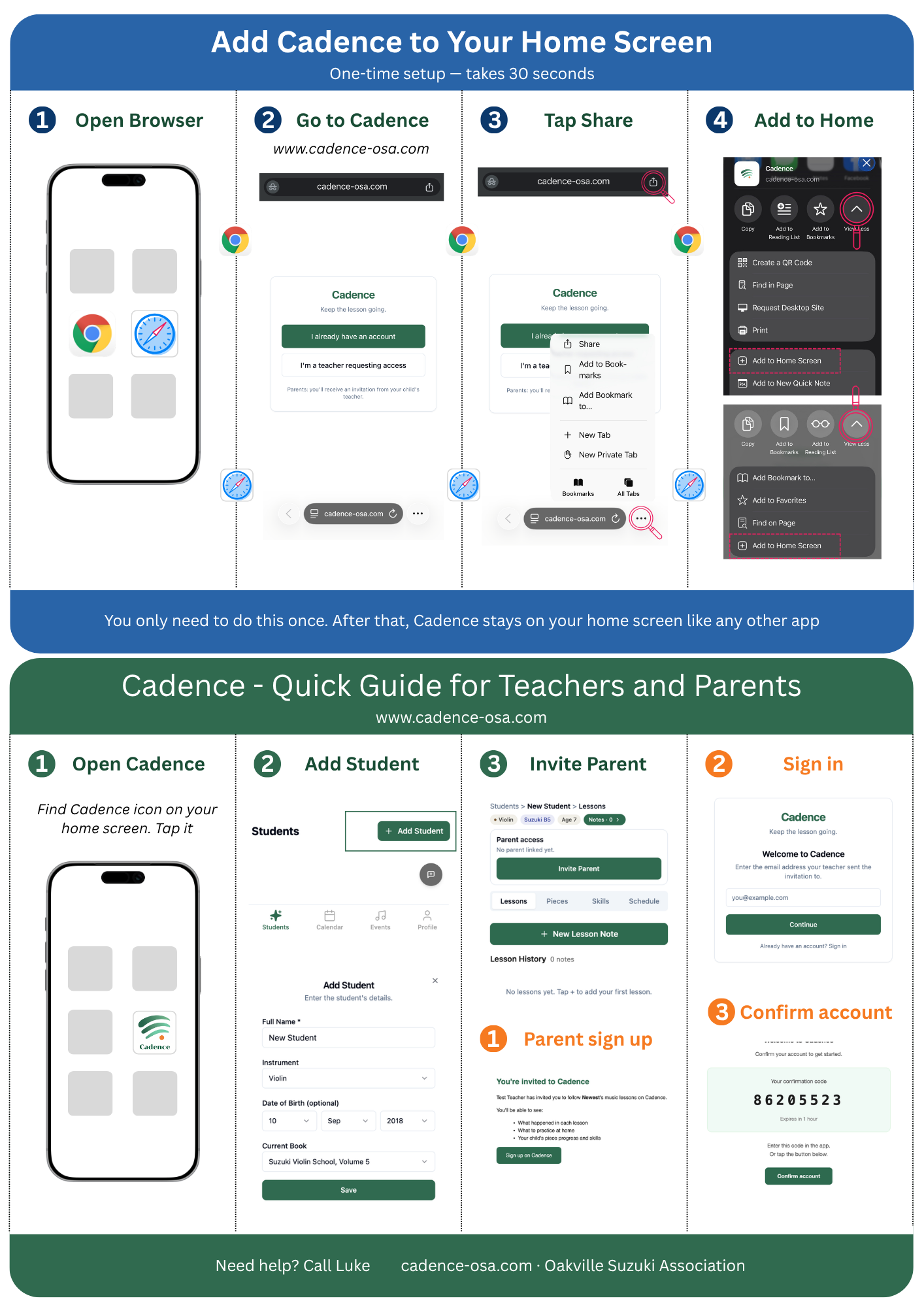
PWA — Add to Home Screen
Cadence is a Progressive Web App. Instead of asking the teacher to search the App Store, manage downloads, or remember a URL, she opens one link, taps “Add to Home Screen,” and gets a Cadence icon that behaves like an app. No App Store friction. No installation anxiety. No extra account setup.
Coach marks — guided inside the app
I added five interactive tours across teacher, parent, and admin workflows. Each tour highlights one action at a time with a short tooltip, so users learn by doing instead of reading a manual. This matters for teachers who are willing to try the product but are not confident exploring software on their own.
Printed guide — designed for the pilot context
I spent two hours in Canva creating a printed, step-by-step guide using real screenshots from the actual Cadence flow. The guide is designed to sit next to the teacher's iPhone while she sets up the app, adds students, and invites parents. This is not scalable onboarding automation. It is founder-led adoption work for the first real user.
Pilot feedback, paraphrased
The pilot teacher responded with strong appreciation, saying the guide made the app feel approachable and that she had been considering a basic computer course because she was not confident with technology.
— J., pilot teacher
This was intentionally unscalable work for the first pilot. The goal was not to create a permanent manual onboarding process. The goal was to remove adoption risk, observe where the product broke down for a low-confidence user, and turn those lessons into reusable onboarding patterns.
Pilot Iteration With a Real Teacher
Cadence is being tested with one real teacher first, not launched broadly.
That matters because the early work is not just shipping features. It is observing how a non-technical teacher actually teaches, schedules, explains practice, and communicates with parents.
Through the pilot, I learned details that shaped the product:
- The pilot teacher works across violin and viola, not only violin.
- Many students follow RCM paths, not only Suzuki.
- Teacher onboarding needed printed guidance, not just an app walkthrough.
- Parent clarity matters as much as teacher data entry.
- The product had to reduce repeated explanation, not create another admin task.
This is still early, but it is real product iteration: observe the user, adjust the workflow, simplify the surface, and avoid scaling before the pilot proves the system is usable.
Rollout and Commercial Path
Cadence was designed to avoid enterprise-style adoption friction.
The first phase is a free pilot with one real teacher and her families. The commercial path starts with teachers, not parents and not the school. Teachers own the workflow and create the data — if the teacher uses Cadence, parents receive value automatically. Teacher-level pricing removes org procurement friction, which is the same adoption logic that shaped the rest of the product.
Future expansion can add an organization layer for visibility across teachers, group-class context, and administrative support — but the product starts teacher-first and stays teacher-first by default. Core progress visibility — lesson notes, piece status, skill tracking, practice guidance — will not be paywalled.
Interactive Prototype
Click through the teacher and parent flows. No account needed.
Technical Architecture
Stack chosen for adoption speed and maintainability, not framework fashion. Every layer is something the operator can debug, deploy, and replace alone.
| Layer | Technology | Role |
|---|---|---|
| Frontend | React 18 + TypeScript + Vite + Tailwind + shadcn/ui | Mobile-first web app |
| Backend | Supabase (PostgreSQL + RLS + Edge Functions) | Data, auth, permissions |
| Auth | Passwordless email OTP | Zero-friction login |
| Deploy | Vercel (auto-deploy from main branch) | Continuous deployment |
| QA | Playwright + manual mobile testing | Browser automation + real-device QA |
| DNS/Email | Cloudflare + Resend | Branded auth emails from auth.cadence-osa.com |
Key Architecture Decisions
| Decision | Why |
|---|---|
| org_id nullable everywhere | Teacher can use Cadence independently — no org required for adoption |
| piece_progress.last_updated_lesson_id NOT NULL | Every progress update ties to a real lesson — no floating data, no orphaned progress entries |
| date type, not timestamptz for lesson dates | A parent in Ontario should see “May 9” not “May 8” because of timezone conversion. This one decision prevented the single most common date bug in the app. |
| Parent-safe database views | Private fields excluded at the database layer, not just the UI — defense in depth |
| Skills architecturally separate from pieces | Technique transfers across repertoire. A child can polish Twinkle but still need work on bow hold. These are different axes of progress. |
| String-split date parsing, never new Date() on bare strings | JavaScript’s new Date('2026-05-09') parses as UTC midnight, which shifts to May 8 in Eastern Time. Every date display in Cadence avoids this trap. |
AI-Assisted Build Workflow
Cadence used a hybrid build approach: enough upfront architecture to avoid costly rework, then small iterative releases around the real teacher workflow. Not pure Agile, not waterfall — risk-shaped.
AI accelerated execution. It did not decide the product.
Luke owned the product model, user flows, data architecture, permission boundaries, QA sequencing, prompt structure, and scope control. AI tools were used as specialized execution agents within a disciplined workflow:
| Role | Tool | What It Did |
|---|---|---|
| Planning + architecture | Claude (chat) | Product discovery, SQL/RLS design, prompt engineering, architecture decisions |
| Frontend + feature execution | Lovable (Groups 1–7), then Claude Code | UI scaffolding, component builds, feature implementation |
| Backend precision | Claude Code | RLS policies, Edge Functions, targeted fixes, git operations |
| QA | Playwright + manual mobile | Automated browser testing + real-device verification |
| Overflow / refactor | Codex | Secondary patches, code cleanup |
The hardest part was not generating code. The hardest part was preventing drift: keeping lesson notes, practice data, skills, pieces, parent views, teacher-private fields, and admin tools aligned to one product model across hundreds of AI-generated commits.
Planning artifacts (8 markdown files totaling ~40 pages) served as the shared memory layer between the human operator and every AI agent. Each build session started by loading the current project state, not by re-explaining the product.
How I Control AI-Generated Implementation
I do not treat AI-generated output as trusted software.
My strongest review loop is product and implementation control: I run the app locally, test the workflow directly, inspect the database and deployment surfaces, refactor UI/UX behavior, and read code deeply only where the system boundary requires it.
For Cadence, that meant checking the parts that could break user trust:
- Workflow integrity — every feature had to preserve the lesson → practice → parent visibility loop.
- UI/UX refactoring — I tested screens directly, adjusted flows, and tightened the interface around how a non-technical teacher would actually use it.
- Schema and RLS control — I reviewed the Supabase data model, parent-safe access boundaries, and role-based visibility rules.
- Local dev and deployment control — I worked across local development, Supabase, Vercel, auth, email, and production deployment instead of treating the app as a black box.
- Targeted code inspection — I do not read every AI-generated line, but I inspect the code when behavior, data boundaries, or production risk requires it.
- QA gates — lint/build checks, Playwright tests, manual browser checks, and mobile review before accepting changes.
One example was Cadence's lesson date handling. AI-generated date code can easily turn 2026-05-09 into the wrong local day because JavaScript parses bare date strings as UTC. new Date('2026-05-09') parses as UTC midnight and can shift backward in Eastern Time — which would show parents in Ontario a lesson on the wrong day.
I kept lesson dates as date-only values in the data model and avoided bare new Date() calls in display paths. This protected a core trust point: parents and teachers must see the same lesson date.
The point is not to manually write or read every line. The point is to know which boundaries matter, inspect those boundaries, and tighten the product before small technical mistakes become real user problems.
Cadence is early. The pilot is live with one teacher. At this stage, maintenance is mostly about catching boundary issues before they reach users, then tightening the system as the pilot reveals new edge cases.
Decisions I'm Proud Of
Magic link auth instead of passwords
Why: Teachers and parents are non-technical. Password friction kills adoption before the product gets a chance.
Tradeoff: Requires reliable email delivery (Resend + custom domain), but removes the single biggest onboarding barrier.
Teacher-first data ownership
Why: Teachers can adopt independently — no org procurement needed. org_id is nullable everywhere.
Tradeoff: Nullable foreign keys add schema complexity, but removing org-level procurement friction was worth it for pilot adoption.
Parent-safe database views
Why: Teachers won't use a system where parents can see private lesson observations. Privacy enforced at the database layer, not just the UI.
Tradeoff: Two views per table (parent_safe_*), more maintenance — but prevents data leaks even if the UI has bugs.
Skills architecturally separate from pieces
Why: A child can polish Twinkle but still need work on bow hold. These are different axes of progress.
Tradeoff: More data model complexity, but prevents the false signal of “finished a song = mastered the technique.”
RLS as product trust, not backend plumbing
Why: Teachers see only their students. Parents see only their children. Private notes never leak across the boundary.
Tradeoff: RLS policies add development overhead and debugging complexity, but they're the reason the pilot teacher trusts the system.
Designed to avoid future operational debt
Why: Maintainability was treated as a product constraint, not a code-quality concern. The goal was not the fastest demo, but a system that could support future books, students, schedules, and parent views without turning every new feature into a rewrite.
Tradeoff: More upfront schema and RLS design time, but the pilot can expand to a second teacher and a second curriculum without architectural rework.
Current Status
Cadence is live in production at cadence-osa.com. The teacher-parent lesson continuity loop, parent practice view, piece and skill progress tracking, scheduling, events, and Super Admin support layer are all functional.
Next phase: profile polish, parent progress reports with PDF export, deeper teacher validation with the pilot teacher's full student roster, and funding transparency for community support.